
MediCare Doctor Appointment System (Mobile)
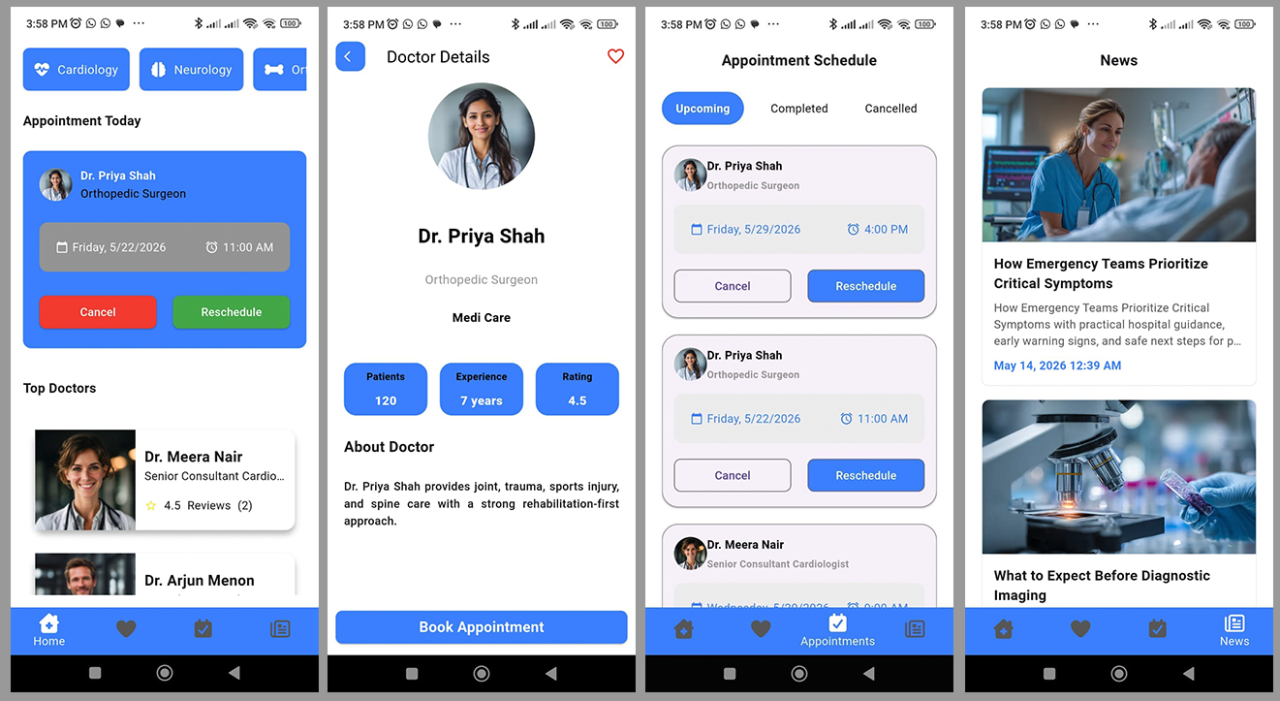
MediCare Doctor Appointment System (Mobile)
MediCare Doctor Appointment System (Mobile) is a Flutter-based patient application connected to the MediCare Doctor Appointment System (Web).
It provides patients with a streamlined mobile experience for:
- Authentication and account access
- Browsing departments and doctors
- Booking appointments
- Managing appointment actions
- Reviewing completed visits
- Saving favourite doctors
- Managing profile and session settings
The application is tightly integrated with the Laravel web administration system, ensuring centralized management of all medical and appointment data.
Target Audiences
Patients
Patients use the mobile application to:
- Browse departments and doctors
- Book and manage appointments
- Review completed consultations
- Save favourite doctors
- Manage their account sessions
Administrators
Administrators manage all mobile-visible data through the Laravel admin dashboard.
Doctors
Doctors receive public visibility through:
- Admin-managed doctor profiles
- Appointment records
- Patient reviews and ratings
Support Staff
Support staff can investigate and manage:
- Appointment issues
- Review moderation
- User-related support requests
Application Structure
The Flutter application uses a tab-based navigation structure optimized for patient workflows.
Core Screens
The application includes:
- Authentication screen
- Home screen
- Doctor details screen
- Appointment booking screen
- Appointment list and details screen
- Appointment reschedule screen
- Favourite doctors screen
- Profile and account management area
- Booking success screen
Home Screen
The home screen is the primary patient landing page after login.
Home Screen Features
The screen displays:
- Logged-in patient name
- Patient avatar (when available)
- Account/avatar popup menu
- Logout action
- Department listings
- Today's appointments
- Paginated doctor listings
- “Load More” functionality for additional doctors
Doctor Details
Doctor details pages display:
- Doctor profile
- Avatar or image
- Designation
- Department
- Ratings
- Review count
- Appointment booking entry point
Favourite Doctor Support
Patients can:
- Add doctors to favourites
- Remove doctors from favourites
Write actions are restricted based on account permissions and demo mode settings.
Favourite Doctors
The favourites system allows patients to save doctors for quick access.
Restrictions
Favourite add/remove actions are blocked for:
- Unverified users
- Demo mode environments
Appointment Booking
Appointment Fields
Patients select:
- Doctor
- Phone number
- Appointment date
- Appointment time
- Message or note
Availability Validation
Before submission, the app checks:
- Appointment availability
- Closed dates
- Weekend restrictions
All validation rules are enforced by the Laravel backend.
Configurable Rules
Administrators can configure:
- Closed appointment dates
- Closure reasons or notes
- Weekend booking restrictions
These rules are shared across:
- Web booking system
- Mobile booking system
Expired closed dates are ignored automatically.
Appointment Features
Patients can:
- View appointment details
- Cancel appointments
- Reschedule appointments
- Submit doctor reviews for completed visits
After every write action, appointment data is refreshed from the API.
Reschedule Appointments
The reschedule screen uses the same availability rules as appointment booking.
Reschedule Workflow
Patients:
- Select a new date and time
- Enter a reschedule reason
- Submit the request
Laravel updates the appointment and appends a new appointment history entry.
Reviews
Patients can review completed appointments.
Review Moderation
Doctor reviews are moderated.
Approved reviews affect public doctor ratings and review summaries.
Booking Success Screen
After successful booking, the application displays a booking confirmation screen.
Patients can then return to the normal application workflow.
Unverified User Restrictions
Unverified users can browse data but cannot perform write operations.
Blocked Actions
- Booking appointments
- Cancelling appointments
- Rescheduling appointments
- Submitting reviews
- Adding favourites
- Removing favourites
Demo Mode
When Laravel demo mode is enabled, all write actions are blocked.
Appointment Availability Rules
Mobile appointment booking follows the same availability rules as the Laravel web module.
Available Appointment Times
- 9:00 AM
- 10:00 AM
- 11:00 AM
- 12:00 PM
- 1:00 PM
- 2:00 PM
- 3:00 PM
- 4:00 PM
Validation Rules
The application prevents:
- Selecting past dates
- Selecting past times for the current day
- Booking on closed dates
- Weekend bookings when disabled
- Double-booking the same doctor at the same date and time
Cancelled appointments do not block future availability.
Server-Side Enforcement
The Laravel API is the source of truth for all validation rules.
Mobile-side validation improves user experience but does not replace backend validation.
Laravel API Dependencies
The mobile module depends on the following API endpoints:
Authentication APIs
- POST /api/login
- POST /api/register
- POST /api/logout
- GET /api/me
Core Data APIs
- GET /api/departments
- GET /api/doctors?page={page}&limit={limit}
- GET /api/appointments
- GET /api/appointment-availability
Appointment APIs
- POST /api/appointments
- POST /api/appointments/{appointment}/cancel
- POST /api/appointments/{appointment}/reschedule
- POST /api/appointments/{appointment}/review
Favourite Doctor APIs
- GET /api/favorite-doctors
- POST /api/favorite-doctors/{doctor}
- DELETE /api/favorite-doctors/{doctor}
Admin Data Dependencies
Most mobile-visible data is maintained through the Laravel administration panel.
Dependency Mapping
Departments
Drive the department listings on the home screen.
Doctors
Drive doctor cards and doctor detail pages.
Doctor Reviews
Drive rating summaries and review displays.
Appointments
Drive patient appointment history and scheduling.
Appointment Availability
Controls booking and rescheduling calendars.
Site & Demo Settings
Influence mobile application behavior and restrictions.
User Profiles
Drive patient names, avatars, and account information.
Information
- Categories: Mobile
- Flutter 3
- Google Play URL: https://play.google.com/